Category Archives: Uncategorized

Roanoke va area ar-5rm setting addendum

https://svonberg.org/wp-content/uploads/2026/05/roanoke_ar5rm_chirp_master.csv

Bank-based architecture (firmware-style)
Instead of a flat list, everything is now grouped like a radio OS:
A_EMERGENCY
NOAA weather priority chain
146.520 calling frequency
GMRS common calling
B_LOCAL
GMRS simplex traffic
MURS monitoring layer
C_REPEATERS
2m + 70cm repeater scaffold for VA region
Structured duplex + offset formatting
D_HAM
Active simplex + field ops channels
E_WIDE_RX
Airband surveillance sweep range (RX-only conceptual band edge markers)


βš™οΈ 2. Priority logic added
Priority 0 = emergency / calling
Priority 1 = repeaters / weather
Priority 2–3 = local traffic / ops
This matters because Baofeng scan order is not neutral β€” it follows memory sequence.


πŸ“‘ 3. Operational behavior improvement
This layout is designed for:
Fast scan response in valleys (Roanoke terrain matters here)
Separation of β€œnoise” (GMRS chatter) from β€œsignal” (repeaters + NOAA)
Clear escalation path:
Weather β†’ Emergency β†’ Local β†’ Regional β†’ Wide RX


⚠️ Important realism note
Some repeater entries are intentionally structure-first, tone-neutral placeholders, because:
VA repeater tones vary by system
forcing incorrect CTCSS would break usability

Roanoke VA area radio settings

https://svonberg.org/wp-content/uploads/2026/05/roanoke_gmrs_fieldsetup.csv

Or all bands

https://svonberg.org/wp-content/uploads/2026/05/roanoke_allbands_ar5rm.csv

On your AR-5RM:
πŸ”§ Turn ON Dual Watch (TDR)
Menu β†’ TDR β†’ ON
πŸ”§ Assign VFO roles:
VFO A: Channel 1 (ANCHOR-GMRS)
VFO B: Scan channels (10–41)
πŸ”§ Set scan mode:
TO (Time Operation)
πŸ”§ Squelch:
Level 3–4

https://svonberg.org/wp-content/uploads/2026/05/roanoke_dualwatch_ar5rm.csv

🎯 Daily carry mode
A: 462.550 repeater
B: scanning
πŸ‘‰ You’ll hear:
Repeater traffic instantly
Plus anything new discovered


πŸ” Alternate mode (ham focus)
Switch A to:
146.520
πŸ‘‰ Now:
A = ham calling
B = everything else
πŸ” Discovery mode
Let B scan:
20–41
When it stops:
Pause
Listen
Log it

https://svonberg.org/wp-content/uploads/2026/05/roanoke_missionprofiles_ar5rm.csv

🎯 Driving
Channel 1 or 2 as anchor
Scan 1–6

πŸ”οΈ Mountain / long-range
Anchor: 20
Scan: 20–25
πŸ‘‰ Best from:
Mill Mountain
Bent Mountain

πŸ™οΈ City
Anchor: 40 or 41
Focus on UHF
πŸ‘‰ Better building penetration
πŸ” Discovery mode
Scan 60–66 only
πŸ‘‰ This is your repeater hunter mode


POWER STRATEGY (huge difference)
Driving β†’ High
Mountain β†’ High
City β†’ Medium if possible
Discovery β†’ High
πŸ‘‰ Adjust to conserve battery


⚑FIELD WORKFLOW
Example day:
Driving β†’ Profile 1
Stop at overlook β†’ switch to Profile 2
In town β†’ Profile 3
Hunting repeaters β†’ Profile 4

⚠️ Why this works
Instead of:
One giant messy scan list ❌
You now have:
Context-based radio behavior βœ”
πŸ‘‰ Faster scanning
πŸ‘‰ More hits
πŸ‘‰ Less frustration

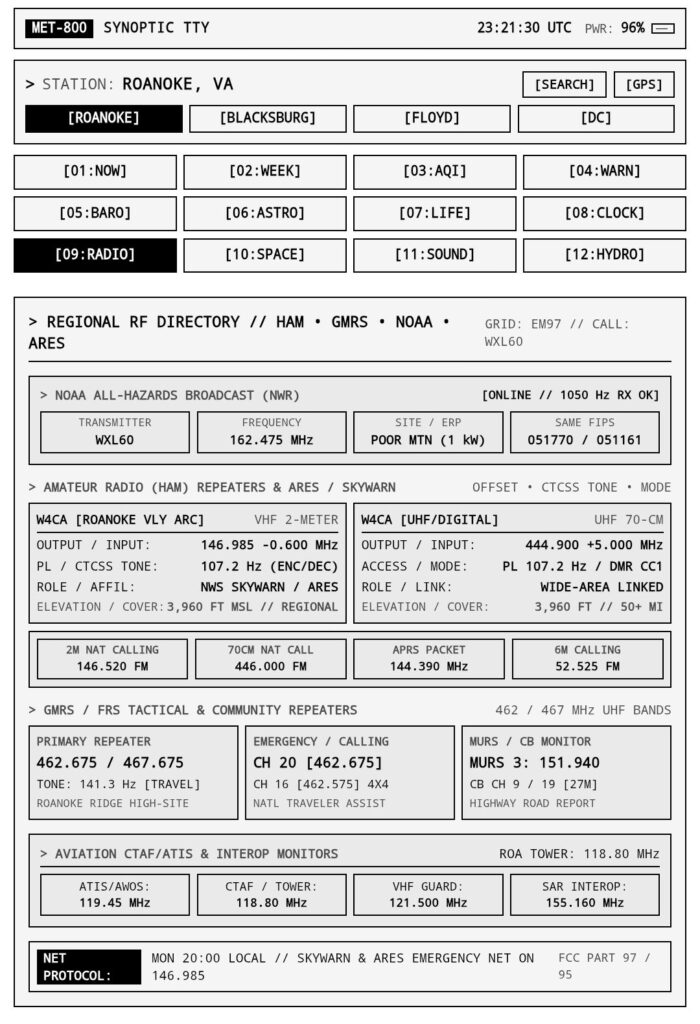
ROANOKE RF QUICK CARD (GMRS + HAM)

=== PRIMARY CHANNELS ===
GMRS CALL:     462.650
GMRS RPT:      462.550 (107.2)
GMRS ALT:      462.675 (123.0)

HAM VHF CALL:  146.520
HAM VHF RPT:   146.940 / 147.150
HAM UHF CALL:  446.000

=== LOCATION β†’ CHANNEL ===

[MOUNTAIN / HIGH GROUND]
β†’ 462.550 (primary)
β†’ 146.520
β†’ 147.150

[DOWNTOWN / BUILDINGS]
β†’ 446.000 (best)
β†’ 462.675
β†’ 462.650

[SUBURBAN / HILLS]
β†’ 462.550
β†’ 462.650
β†’ 146.520

[DRIVING / MOBILE]
β†’ 462.650 (primary)
β†’ 462.550
β†’ 146.520

[RURAL / VALLEY]
β†’ 462.550
β†’ 147.150
β†’ 146.520

=== FAST DECISION RULE ===

HIGH GROUND? β†’ VHF or GMRS RPT
IN BUILDINGS? β†’ UHF (446.000)
MOVING? β†’ GMRS 462.650
NEED RANGE? β†’ REPEATER

=== SIGNAL EXPECTATIONS ===

S7–S9 β†’ Excellent (mountains)
S4–S6 β†’ Usable (suburbs)
S1–S3 β†’ Weak (valleys)

=== QUICK TROUBLESHOOT ===

No signal?
β†’ Move higher
β†’ Step outside
β†’ Switch to repeater

Broken audio?
β†’ Try UHF
β†’ Change position

No contacts?
β†’ Call on:
146.520
462.650

=== PRO TIP ===
HEIGHT > POWER
A hill beats a better radio every time.

Generated a pocket card

https://svonberg.org/wp-content/uploads/2026/05/roanoke_verifiedmaster_ar5rm.csv

WSJP248 – my gmrs id

Day 20,907 seed 570229065135

they say there’s a second roanoke under the first one
not tunnels like cities have
not tourist caves with helmets and gift shops

i mean the real ones
wet rock lungs breathing slow under your feet

you don’t find them on purpose

they open up behind things
a busted fence off orange
a slit in the woods past a half-dead trail
a place where the ground just gives up pretending

and inside
it’s colder than it should be
even in july

sound works different
drips echo like footsteps
your own breathing sounds like someone else is there

people go down there
not hikers
not families

kids with flashlights that barely work
someone’s older brother who swears he knows the way
someone who said they needed to get out for a minute and didn’t say from what

there’s always marks on the walls
names half scratched in
dates that don’t make sense
symbols nobody admits to drawing

and deeper in
stuff gets left behind

a hoodie
empty bottles
a single shoe
once, a shopping cart that definitely didn’t get there by accident

you stay long enough
you start thinking about how close the town is above you

cars passing
people arguing in parking lots
someone ordering fries
someone falling asleep with the tv on

all of it just…
right there

but down here it doesn’t reach

no signal
no time
just rock and water and whatever you brought in with you

some people say there are exits miles away
like you could walk under the whole valley if you knew how

nobody ever proves it

mostly
you come back the same way you went in

mud on your hands
that cave smell stuck in your clothes
a little quieter than before

and if you listen later
back in your room
windows closed
lights off

you can still hear it

drip
drip
drip

#thegleest #roanokeva #bewarethegleestak

Skunk visit April 30

Whoopie pie has a nice little trot

Whoopie Pie the Skunk , coming through ! Make way for skunk !

I love these little critters. Fortunately, they seem safe from predators, and aren’t spraying or digging up the garden, so the cute little fur balls are welcome to trot through anytime.

(They’d still be welcome if they did, but I’m glad they are good neighbors)

#RoanokeVA #skunk #backyardzoo

I need create a scorecard for the different skinks that come through. We have at least six named and there may be more. King, Prince, Flying V , Queen , Whoopie Pie and Stinkothy are all very different in markings, size,  and behavior.

Bonus video

To set up my new little display in arduino

Once you get this initial setup done, you will never have to do it again for this board. From then on, it’s just copying, pasting, and uploading.

Here is the step-by-step guide to getting your software ready:

### Phase 1: Download the Software
1. Go to the official Arduino website (arduino.cc) and download the **Arduino IDE** (version 2.x).
2. Install it and open the application. It will look like a blank text editor.
### Phase 2: Teach the Software About the ESP32
Out of the box, the Arduino IDE only knows about standard Arduino boards. We have to tell it where to find the “blueprints” for your Seeed Studio ESP32S3 chip.


1. In the Arduino IDE, click on **File > Preferences** (or Arduino IDE > Settings on a Mac).
2. Look for a box near the bottom called **”Additional Boards Manager URLs”**.
3. Copy and paste this exact link into that box:
Β Β  https://raw.githubusercontent.com/espressif/arduino-esp32/gh-pages/package_esp32_index.json

4. Click **OK**.
5. Now, look at the left-hand sidebar of the software and click on the **Boards Manager** icon (it looks like a circuit board or a stack of books).
6. Type **esp32** into the search bar.
7. Look for the package titled **”esp32 by Espressif Systems”** and click **Install**. (This might take a minute or two to download).

### Phase 3: Select Your Specific Board
Now that the software knows about ESP32 chips, we just need to tell it exactly which one is plugged into your computer.
1. Plug your XIAO ESP32S3 into your computer using a USB-C data cable. *(Make sure the physical switch on the Round Display is pushed to the “ON” position!).*
2. At the very top of the Arduino IDE screen, click the dropdown menu that says **”Select Board”** and click **”Select other board and port…”**
3. In the “Boards” search box, type in **XIAO_ESP32S3** and select it.
4. In the “Ports” column right next to it, select the USB port your board is plugged into (it usually says something like COM3 on Windows, or /dev/tty.usbmodem on Mac). Click **OK**.

### Phase 4: Add the Display Libraries
The screen needs two specific “libraries” (pre-written code files) to draw graphics easily. Seeed Studio has custom-made these to perfectly match the Round Display’s wiring so you don’t have to configure anything.

1. Go to the official **Seeed Studio Round Display Wiki** (search Google for *”Getting Started with Seeed Studio Round Display for XIAO”*).
2. Scroll down to the **Software Preparation** section.
3. Download the two specific ZIP files they link to: the **TFT_eSPI** library and the **RTC** library.
4. Back in the Arduino IDE, click **Sketch > Include Library > Add .ZIP Library…**
5. Select the ZIP files you just downloaded to install them.

### Phase 5: Copy, Paste, Flash!
You are officially ready to go.

On that exact same Seeed Studio Wiki page, scroll down to the **”Hardware Test”** or **”TFT_Clock”** examples. You will see a block of code.

1. Copy that entire block of code.
2. Paste it into your Arduino IDE (deleting the blank code that was already there).
3. Click the **Right-Facing Arrow (Upload)** button in the top left corner of the Arduino IDE.
The software will compile the text, flash it over the USB cable, and your blank screen will activate.

Ubuntu on a jailbroken ps5

There's a public release of linux installer for jailbroken PS5's. Allowing PS5's to run steam, discord, etc. turning it into a standard gaming pc and it can reportedly play games at 4K60github.com/ps5-linux/ps…

Scottobear (@scottobear.bsky.social) 2026-04-30T13:06:03.293Z

There’s a public release of linux installer for jailbroken PS5’s.

Allowing PS5’s to run steam, discord, etc. turning it into a standard gaming pc and it can reportedly play games at 4K60

https://github.com/ps5-linux/ps5-linux-loader

Feldgeister

Feldgeister (field spirits) or KorndΓ€monen (corn demons) are mythical beings in German folklore that inhabit fields, crops, and trees.

These spirits, often appearing as humans, animals, or hybrids, are believed to protect crops, influence harvests, or bring illnesses. They are tied to the harvest cycle, often taking refuge in the last standing grain stalks before being “trapped” or harvested with the final crop.

Feldgeister Types:

Roggenmuhme (Rye Aunt): A spirit with fire-spouting fingers and a birch rod, known for stealing children.

Bilwis: A barefoot creature, often appearing with a sickle on its toe to cut grain.

Kornwolf (Corn Wolf): A large wolf-like creature with fur resembling cornstalks, believed to inhabit grain fields.

Getreidehahn/Erntehenne (Grain Cock/Harvest Hen): Associated with harvesting, they die when the last stalk is cut.

Feldgeister (field spirits) or KorndΓ€monen (corn demons) are mythical beings in German folklore that inhabit fields, crops, and trees.

Scottobear (@scottobear.bsky.social) 2026-04-29T18:11:55.621Z